The Easiest Way to EDIT Audio & Video for Podcast and YouTube // Premiere
125,528 View

- Publish Date:
- January 12, 2026
- Category:
- Equipment for Podcasting
- Video License
- Standard License
- Imported From:
- Youtube
✨✨In this game-changing Premiere tutorial, you'll learn the fastest and easiest way to edit video and audio at the same time for podcast episodes that can go to YouTube, Spotify, and as audio-only episodes to all of the other podcast players.
Check out the 2026 UPDATED Video HERE:
https://youtu.be/9H7itfichRg?si=NdTkIoeSgnpRscBb
Studio Steve will show you how to create a multi-cam sequence out of one shot. This will turn one shot into three shots and allow you to emphasize who is speaking.
Then he'll show you how to become LIGHTING FAST at editing video and audio at the same time, with his signature step: THE SWITCH & CUT!
And as if that wasn't enough, he will also teach you how to treat the audio professionally and add final color correction and skin softening effects.
Try our New Podcast Builder Platform, Podcast YourWay, for FREE
https://www.podcastyourway.com
🎯 Need help planning or installing your studio? Book a consult with Veronica at PSS Creative Media. https://pss.media/one-on-one-support
✨ Become a Professional Video & Podcast Editor ✨
https://www.podcastingsmart.com/editlab
🎧 Become a Certified Podcast Editor and Launch your Freelance Business
Podcast EditLab is a group coaching program that will get you from Zero to impressive portfolio + clients in only 12 weeks.
Apply here👇🏻
https://www.podcastingsmart.com/editlab
⏱ TIMESTAMPS ⏱
0:00 Intro
3:10 Create Multi-cam Sequence
6:46 Sync Audio with Video
8:07 Add Intro
9:24 The SWITCH & CUT
12:00 Treat AUDIO
15:06 Color Grade
16:42 Export
**🎤 🎬 Launch your podcast/video podcast with us **
We help six and seven-figure creative CEOs launch their podcasts or video podcasts so they connect with their audience, turn listeners into loyal customers, and build their authority in their industry.
Book your Consult
Go to 👉🏻 https://pss.media
✨FREE MINICOURSE✨
Idea to Podcast Simplify for Business owners is a video series minicourse for those who want a podcast for their business but have questions about ROI, workflow, equipment, and strategies to use a podcast to grow their business.
Sign up here 👇🏻
https://www.podcastingsmart.com
🤗 Say hi on Social
https://www.instagram.com/psscreativemedia/
https://www.linkedin.com/in/veronica-davis-pss/
🎧 Become a Certified Podcast Editor and Launch your Freelance Business
Podcast EditLab is a group coaching program that will get you from Zero to impressive portfolio + clients in only 12 weeks.
Apply here👇🏻
https://www.podcastingsmart.com/editlab
Subscribe to our Podcast Content Jefe 🎤
Learn from Content Jefes ( Bosses) in the creator Industry
https://www.youtube.com/channel/UC6Np_I8RFIFwfPPvD-yBReA
Visit PSS Creative Media 's Amazon Storefront to Purchase our Gear
https://www.amazon.com/shop/podsoundschool/list/1BBWWZK1YXF3J?ref_=cm_sw_r_cp_ud_aipsflist_aipsfpodsoundschool_B7KE546MNJ8Q309J3AXV
Disclosure: As an Amazon Associate, we earn from qualifying purchases made through the links provided in this description. This means we may receive a small commission at no additional cost to you if you choose to make a purchase through these links.
Your support helps keep the content coming! Thank you!
-----------------
Podcast Outsourcing
🎙️ Ready to stop drowning in podcast production tasks? If you're tired of spending countless hours editing, uploading, and managing your show instead of actually podcasting, this is your solution. Podcast Outsourcing teaches you how to delegate the time-consuming parts of podcasting so you can focus on what you do best—creating great content.
Imagine showing up to record, then letting a team of skilled freelancers handle everything else—audio editing, blog creation, guest scheduling, uploading episodes, and more. This course walks you through how to build your dream team of remote support, streamline your workflow, and save serious time and money in the process.
You’ll also discover how outsourcing not only boosts your podcast’s growth but also creates real opportunities for people around the world.
👉 Click here to join the online class now and start working smarter—not harder—with podcast outsourcing that scales your success.
Top 2 Podcasting Equipment for Superior Audio Quality
Logitech Blue Yeti Nano USB Microphone
The Logitech Blue Yeti Nano USB Microphone brings reliable quality to the streaming, gaming, and podcasting world. Combining elegance and simplicity, Logitech designed this microphone to offer professional-grade recordings directly on your PC or Mac. Thanks to its plug-and-play capability, ease of use is at its peak. Its compact size makes it an ideal choice for on-the-go creators.
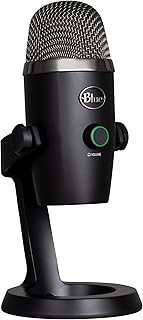
Snag the Logitech Blue Yeti Nano on Amazon now
TONOR TC-777 Podcast Microphone
Rank up your quality with the TONOR TC-777 Podcast Microphone. Designed for podcasting, streaming, and vocal recording, this USB computer microphone with a cardioid condenser ensures crisp audio detailing. It’s compatible with PC, laptops, and PS4/5 and comes with a tripod stand and pop filter, proving it’s a great all-in-one audio solution for aspiring podcasters and streamers.
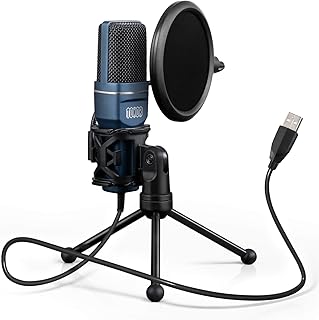
Grab your TONOR TC-777 Podcast Microphone on Amazon
Sponsored Area