Editing a Multicam Podcast in Davinci Resolve wIth Autopod and Social Media Clips With ChatGPT
341 View

- Publish Date:
- October 17, 2026
- Category:
- Equipment for Podcasting
- Video License
- Standard License
- Imported From:
- Youtube
This is an editing workflow that is uncut that shows how I capture, process, and edit multicam podcasts, and how I leverage AI tools like Autopod and ChatGPT using the transcription from DaVinci Resolve to optimize how I find social media clips and how I avoid paying for subscriptions and monthly fees. Obviously, Autopod is a monthly subscription, and so is ChatGPT, but they are much more affordable than paying for these more expensive AI video editing tools. This keeps cost down and efficiency up.
00:00 – Podcast Capture Setup
How I record synchronized cameras and audio using the RØDECaster Video.
01:40 – Understanding the Recorded Files
Which camera and audio files the RØDECaster or ATEM Mini ISO creates—and which ones I actually use.
02:20 – Organizing the DaVinci Resolve Project
How I import the media and organize bins for the full episode and timelines.
03:00 – Building the Multicamera Timeline
How I stack four synchronized camera angles and create the full podcast timeline.
04:50 – Separating the Two Microphones
How I split a stereo recording into individual host and guest audio tracks.
07:00 – Creating a Protected Backup Timeline
Why I duplicate the synchronized timeline before making edits or using AI tools.
08:05 – Matching and Correcting Camera Color
How I set the output color space, correct exposure, and match four different cameras.
16:50 – AI Audio Checkerboarding
How DaVinci Resolve separates each speaker and removes unwanted microphone bleed.
20:45 – Cleaning Up Podcast Audio
How I use compression, EQ, resonance removal, and room-noise reduction.
26:15 – Setting Up AutoPod
How I assign speakers, camera angles, wide-shot frequency, and cut timing.
30:30 – Creating the AI Multicamera Edit
How AutoPod analyzes the speakers and creates the first complete camera cut.
32:15 – Reviewing and Correcting the AI Edit
Why human judgment, pacing, eye lines, and quality control are still necessary.
36:25 – Why I Edit in DaVinci Resolve
Why I prefer locally owned project files over cloud editors and subscription-based software.
38:15 – Refining the Podcast Edit
How I improve framing, restore natural reactions, and manually adjust the AI camera choices.
45:50 – Creating a Social Media Timeline
How I duplicate the finished episode and transcribe it to find short-form content.
48:05 – Converting the Edit to Vertical Video
How I change the timeline to 9:16 and reframe the cameras for social platforms.
49:00 – Editing the First Social Media Short
How I find a strong quote, remove gaps, reframe the speaker, and generate animated subtitles.
56:15 – Editing the Second Social Media Short
How I quickly repeat the process to create additional clips from the full podcast.
01:03:00 – Final Workflow and Takeaways
How the full AI-assisted podcast workflow comes together and where human editing still matters.
-----------------
Podcast Pacing for Audience Engagement
🎙️ Want to capture your listeners’ attention and keep them hooked? Podcast Pacing for Audience Engagement is your guide to mastering the rhythm of compelling communication. You'll learn how to build a strong pacing foundation, shift your pace to add value, understand how your delivery is perceived, and use pacing to express authentic passion. Whether you're just starting out or looking to fine-tune your skills, this class will help you speak with greater impact and confidence.
👉 Click here to join the online course now and start creating podcasts your audience will love!
Top 2 Podcasting Equipment for Superior Audio Quality
TONOR TC-777 Podcast Microphone
Rank up your quality with the TONOR TC-777 Podcast Microphone. Designed for podcasting, streaming, and vocal recording, this USB computer microphone with a cardioid condenser ensures crisp audio detailing. It’s compatible with PC, laptops, and PS4/5 and comes with a tripod stand and pop filter, proving it’s a great all-in-one audio solution for aspiring podcasters and streamers.
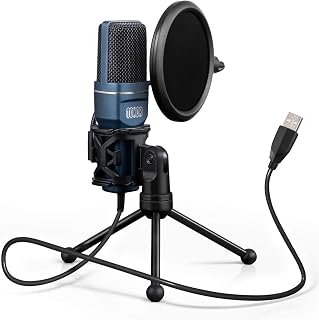
Grab your TONOR TC-777 Podcast Microphone on Amazon
USB C Lavalier Microphone Wireless Mini Mic
This USB C Lavalier Microphone is a compact and handy addition to any aspiring content creator’s arsenal. Designed specifically for Type-C Android devices, tablets, or PCs, it's perfect for video recording. Additionally, the microphone’s denoise recording feature helps ensure quality sound while the rotatable clip offers flexibility of use.
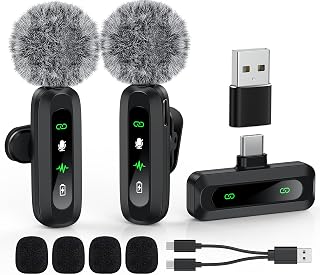
Shop this USB C Lavalier Microphone on Amazon
Sponsored Area