How to Edit a Podcast with Text-Based Editing in Adobe Premiere Pro
713 View
- Publish Date:
- September 26, 2026
- Category:
- Equipment for Podcasting
- Video License
- Standard License
- Imported From:
- Youtube
Learn how to edit a podcast using text-based editing in Adobe Premiere Pro. In this tutorial, you'll see how Premiere Pro can automatically transcribe your podcast, identify filler words and pauses, and let you edit your audio directly from the transcript.
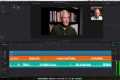
I'll walk through importing your podcast audio, opening the Text-Based Editing workspace, enabling automatic transcription, removing filler words, fixing rough audio cuts, and creating smoother podcast edits with the Rolling Edit Tool and Constant Power audio transitions.
You'll also learn how to enable Show Audio Time Units for more precise audio editing and how Premiere Pro's Q and W keyboard shortcuts can quickly remove unwanted sections around the playhead.
If you're looking for a faster podcast editing workflow, Adobe Premiere Pro's text-based editing tools can make cleaning up dialogue, pauses, filler words, and mistakes much easier.
00:00 Edit podcasts with text-based editing
00:13 Import your podcast into Adobe Premiere Pro
00:35 Open the Text-Based Editing workspace
00:47 Enable automatic transcription
01:05 Using the podcast transcript
01:19 Select filler words and edit from text
01:31 Delete filler words from your podcast
01:43 Fix cuts with the Rolling Edit Tool
01:55 Add a Constant Power audio transition
02:15 Enable Show Audio Time Units
02:26 Fine-tune audio edits
02:52 Remove unwanted gaps
03:07 Use Q and W for faster timeline editing
03:22 Text-based podcast editing workflow
Topics covered:
- Adobe Premiere Pro podcast editing
- Text-based editing in Premiere Pro
- How to edit a podcast with text
- Automatic podcast transcription
- Removing filler words and pauses
- Editing podcast audio in Premiere Pro
- Rolling Edit Tool for audio
- Constant Power audio transitions
- Show Audio Time Units
- Premiere Pro Q and W shortcuts
- Podcast editing workflow
#AdobePremierePro #PodcastEditing #TextBasedEditing #PremierePro #PodcastTutorial
https://www.youtube.com/channel/UCmGXH-jy0o2CuhqtpxbaQgA/join
-----------------
Podcast in The Classroom - Kindergarten to High School
Looking for a fun and engaging way to teach students? Podcasting in the Classroom is an incredible tool that brings multimedia learning to life! Whether you're teaching Kindergarten or High School, this course will show you how to use podcasts to enhance learning, engage students, and even involve parents.
In this course, you’ll learn how to:
✅ Use podcasts as an interactive tool to engage your students
✅ Teach students how to create their own podcasts
✅ Keep parents and students up-to-date with podcast updates
✅ Review and improve teaching performance through podcasts
✅ Overcome common challenges like copyright and privacy concerns
With over one billion podcast subscribers worldwide, your students are likely already listening to podcasts — now, let them create their own! 📚
👉 Click here to enroll now and take your teaching to the next level with podcasts.
Make learning more interactive and fun — let's get podcasting in the classroom! 🎤
Top 2 Podcasting Equipment for Superior Audio Quality
USB C Lavalier Microphone Wireless Mini Mic
This USB C Lavalier Microphone is a compact and handy addition to any aspiring content creator’s arsenal. Designed specifically for Type-C Android devices, tablets, or PCs, it's perfect for video recording. Additionally, the microphone’s denoise recording feature helps ensure quality sound while the rotatable clip offers flexibility of use.
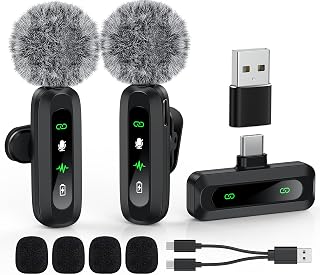
Shop this USB C Lavalier Microphone on Amazon
MAONO Podcast Equipment Bundle Audio Mixer All-in-One Studio
This MAONO podcast equipment bundle provides an all-in-one solution for your podcasting needs. With its impressive 35mm microphone, this bundle ensures your voice comes through clearly and professionally in every live stream or podcast. Whether used with a PC or smartphone, this studio setup offers unparalleled audio quality for any format of recording, even including DJ sessions. Its robust features make it a toolkit worthy of any podcasting enthusiast.
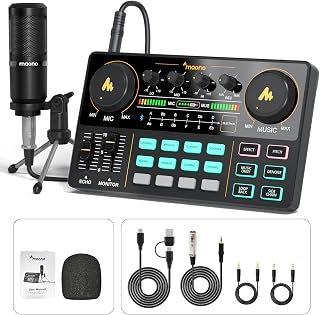
Check out this MAONO podcast equipment bundle on Amazon now
Sponsored Area