Adobe Podcast Tutorial: Turn Bad Audio Into Studio Sound in 2026
3,502 View

- Publish Date:
- October 8, 2026
- Category:
- Equipment for Podcasting
- Video License
- Standard License
- Imported From:
- Youtube
We walk through a step-by-step review of Adobe's AI-powered speech enhancement tools, showing you real side-by-side examples of original versus enhanced audio. You'll see exactly how this software isolates voice tracks from loud street noise and background music to deliver professional, studio-grade results.
🔗 Links:
https://podcast.adobe.com/en
⏱️ Chapters:
0:00 Introduction to Adobe's AI Audio Tool
0:23 Adobe Podcast Feature Overview
1:39 Testing the Speech Enhancer (Before and After)
2:49 Adding Video Captions and Customizing
3:15 Removing Music from Audio and Video Files
4:03 Final Thoughts and Outro
🔔 Subscribe and join the AI Unboxed community to stay ahead in the rapidly evolving world of artificial intelligence. New AI tools, AI software reviews, tutorials and AI news, every week.
👉 Subscribe here: https://www.youtube.com/channel/UCi369jkK9Ro-MrElPQzuqkw?sub_confirmation=1
Business & Collaboration:
📧 [email protected]
💬 WhatsApp: +1 (352) 722-6361
Telegram: https://t.me/AiPromoOfficial
Official Website: https://aipromo.ai/
⚠️ Disclaimer: This video is for educational and informational purposes only. Tools and features shown may change over time. Some links may be affiliate links that support the channel at no extra cost to you.
#adobeaudio #audioenhancer #aitools2026 #podcasttips
-----------------
Podcast Pacing for Audience Engagement
🎙️ Want to capture your listeners’ attention and keep them hooked? Podcast Pacing for Audience Engagement is your guide to mastering the rhythm of compelling communication. You'll learn how to build a strong pacing foundation, shift your pace to add value, understand how your delivery is perceived, and use pacing to express authentic passion. Whether you're just starting out or looking to fine-tune your skills, this class will help you speak with greater impact and confidence.
👉 Click here to join the online course now and start creating podcasts your audience will love!
Top 2 Podcasting Equipment for Superior Audio Quality
RØDE PodMic USB Dynamic Broadcast Microphone
The RØDE PodMic is a dynamic microphone with XLR and USB connectivity, designed to deliver excellent sound quality in any broadcast scenario. It’s incredibly versatile and suited to a wide array of applications, from podcasting and streaming to gaming, music-making, and content creation. With RØDE, you know you're getting a durable microphone that can withstand busy content creation schedules while consistently delivering top sound quality.
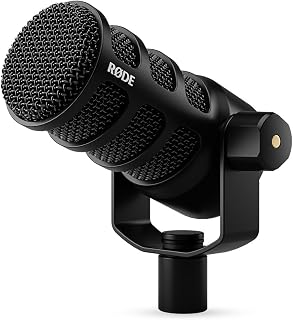
Purchase the RØDE PodMic on Amazon
TONOR TC-777 Podcast Microphone
Rank up your quality with the TONOR TC-777 Podcast Microphone. Designed for podcasting, streaming, and vocal recording, this USB computer microphone with a cardioid condenser ensures crisp audio detailing. It’s compatible with PC, laptops, and PS4/5 and comes with a tripod stand and pop filter, proving it’s a great all-in-one audio solution for aspiring podcasters and streamers.
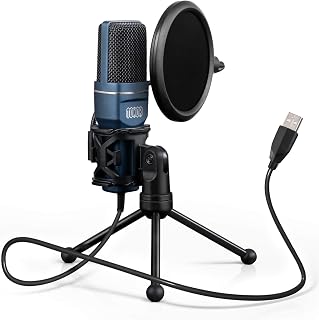
Grab your TONOR TC-777 Podcast Microphone on Amazon
Sponsored Area