How to edit your podcast using Adobe Audition: A guide for beginners
660 View
- Publish Date:
- October 9, 2026
- Category:
- Equipment for Podcasting
- Video License
- Standard License
- Imported From:
- Youtube
In this beginner-friendly tutorial for Adobe Audition, I'll walk through the following essential tools so you can start editing your episodes:
1. Importing audio files
2. Clipping tracks
3. Adjusting volume
4. Adding out point
5. Saving and Exporting
Resources
Adobe Audition
https://www.adobe.com/uk/products/audition.html
Follow me:
LinkedIn https://www.linkedin.com/in/laura-wilkes-video-podcast-coach/
Instagram https://www.instagram.com/communicating_for_impact/
Want to start podcasting to grow your education business?
Podcast Pathfinder programme: https://communicating-for-impact.com/podcast-pathfinder-programme
My recording equipment and affiliate links
RØDE NT-USB Microphone https://amzn.to/3I4XfJ8 (Featured)
RØDE PSA1+ Professional Studio Arm https://shorturl.at/dpwHU (Featured)
Note: you can unclamp and move the studio arm accessories. The fixture is a C-Clamp, so requires no drilling or screws.
Set up your home studio:
https://communicating-for-impact.com/blog-1/setting-up-a-podcast-studio-at-home
My podcasting setup:
https://youtu.be/S2fox2JP4GE?si=Rk7UYQSIA7ndwiLE
Timestamps
00:21 Creating a new project
00:54 Importing an audio file
01:11 Clipping tracks
02:40 Adding and looping music files
02:51 Adjusting track volume
04:53 Setting an outpoint
05:38 Exporting podcast episode
DISCLAIMER: This video description contains affiliate links, meaning I'll receive a small commission if you click on one of the product links. This helps support the channel and the work I do. I appreciate your support! Everything in this video is based on my own experience and research. Please do your own research before making any decisions. You and only you are responsible for the decisions you make. Thanks for watching!
-----------------
Realtor Podcast Marketing for Real Estate Agents Success
🏡 Want to stay top-of-mind with potential buyers and sellers—even when you're off the clock? Realtor Podcast Marketing for Real Estate Agents Success is your roadmap to creating a podcast that keeps working for you 24/7. Imagine having the undivided attention of your ideal clients every week, right in their earbuds, building trust and positioning you as their go-to Realtor—no matter when they’re ready to make a move.
This class walks you step-by-step through setting up your own real estate podcast, even if you’ve never recorded before. You'll learn how to use this powerful marketing tool to reach your farm area, stay connected with past leads, and establish a personal presence that traditional marketing just can't match.
👉 Click here to join the online course now and start building a real estate brand that speaks directly to your audience—anytime, anywhere.
Top 2 Podcasting Equipment for Superior Audio Quality
MAONO Podcast Equipment Bundle Audio Mixer All-in-One Studio
This MAONO podcast equipment bundle provides an all-in-one solution for your podcasting needs. With its impressive 35mm microphone, this bundle ensures your voice comes through clearly and professionally in every live stream or podcast. Whether used with a PC or smartphone, this studio setup offers unparalleled audio quality for any format of recording, even including DJ sessions. Its robust features make it a toolkit worthy of any podcasting enthusiast.
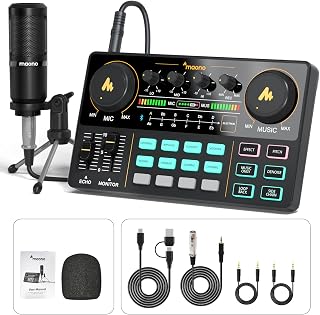
Check out this MAONO podcast equipment bundle on Amazon now
Audio Interface Podcast Equipment Bundle for 2
This podcast equipment bundle for two is suitable for live streaming, YouTube, gaming, and even singing. The bundle features a distinct audio interface with an in-built voice changer, condenser microphones that ensure top-quality sound, and a reasonable price tag. It is a perfect choice for gamers or anyone looking to start a dual-host podcast.
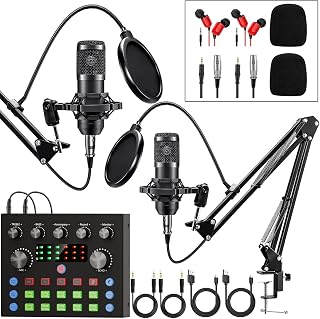
Own this podcast equipment bundle from Amazon
Sponsored Area