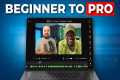
Best Budget Podcast Setup and Software 2026
268 View

- Publish Date:
- January 20, 2026
- Category:
- Equipment for Podcasting
- Video License
- Standard License
- Imported From:
- Youtube
Use code: GALFREE to get 30 days free of Riverside Pro: https://creators.riverside.com/PremiereGal
Thanks to Riverside for sponsoring this video!
Sign up for early access to my Premiere Course: https://go.premieregal.com/pr-course
______________________________________
BUDGET PODCAST SETUP
Use your phone as a webcam (if using an Apple computer, plugin your phone via USB-C into your computer) more info: https://riverside.sjv.io/09E0aY
Maono Mic $84: https://amzn.to/4btu5TU
Cheaper Microphone: Fifine K669S $29.99: https://amzn.to/3YBXHHb
Desk Ring Light $39.99 https://amzn.to/45PDX6K
Phone Tripod $22.99: https://amzn.to/3LrdsOi
Riverside Free Plan: https://creators.riverside.com/PremiereGal
______________________________________
PRO PODCAST SETUP
Use your Mirrorless Camera as a webcam
I use the Canon EOS R with a 35mm RF fixed lens https://amzn.to/3NwOpKg and https://amzn.to/4qvvGxc
Capture Card $21.99: https://amzn.to/3YERaeT
Mini HDMI to HDMI Cable $9.79: https://amzn.to/3NabPFh or Micro HDMI to HDMI Cable $6.39: https://amzn.to/4qWfHs1 (Depends on your camera if it takes Micro or Mini)
Keylight Softbox $199: https://amzn.to/3Z9Qled
Tube Light $199: https://amzn.to/3LdbK33
LED Panel Spot Light (Background): $49.99 https://amzn.to/3Nkt72o
Ray Microphone $449: https://amzn.to/4b2zgKB
Connect 2 Audio Interface $229: https://amzn.to/49AEM4y
Use code: GALFREE to get 30 days free of Riverside Pro: https://creators.riverside.com/PremiereGal
______________________________________
Having trouble with podcast video editing, especially when your audio waveforms don't match? This video addresses a common issue where two podcast clips fail to synchronize, often due to differing audio from each guest. We'll show you an awesome podcast setup and software solution to efficiently edit podcast content in 2026 and avoid manual synchronization struggles.You'll also learn a quick way to export your podcast from Riverside to edit in Premiere Pro.
This video shows you how to edit your podcasts with style in Premiere Pro: https://youtu.be/QtpEl-PVAjI?si=PvjUQ1oC22RZh-Vb
______________________________________
GAL's TOOLS & GEAR
➜ Premiere Gal Editing ShortCut Keyboard: https://premieregal.com/keyboard
➜ Camera & Gear: https://premieregal.com/gear
➜ Premiere Gal Merch: https://premieregal.com/merch
➜ eBook "The Video Editors Checklist" https://shop.premieregal.com/products/ebook-the-video-editors-checklist
______________________________________
TIMECODE CHAPTERS
00:00:00 - Introduction
00:00:08 - Problem with Traditional Editing
00:00:29 - Solution: Riverside Studio
00:01:04 - Beginner Budget-Friendly Setup
00:03:15 - Professional Setup
00:10:00 - Editing in Riverside Studio
00:13:19 - Using AI for Editing
00:14:28 - Magic Clips Feature
00:15:33 - Exporting to Premiere Pro
00:16:14 - Conclusion
______________________________________
FOLLOW ME ON SOCIAL
➜ http://instagram.com/Premiere_Gal
➜ https://tiktok.com/@Premiere_Gal
➜ http://twitter.com/Premiere_Gal
➜ http://facebook.com/PremiereGal
➜ https://patreon.com/PremiereGal
Website ➜ http://premieregal.com
For sponsors:
[email protected]
Affiliate Disclaimer: Some of these links in this description are affiliate links. I'll earn a small commission if you make a purchase and it's no additional cost to you.
#podcast #videoediting
-----------------
PODCAST MASTERY: How to Make, Market, and Monetize Podcasts
Are you ready to learn how to Make, Market, and Monetize your podcast — even if you're just starting out? This fast-paced, value-packed course will show you exactly how to launch and grow a podcast that attracts listeners, builds authority, and generates income.
You'll learn:
✅ The best equipment to use
✅ How to find engaging guests
✅ How to land sponsorships easily
✅ Ways to grow your audience fast
✅ How to sell your products or services through your podcast
✅ What to do if you don’t have a product (yet!)
Whether you're an entrepreneur, creative, coach, or just have something to say — this course will guide you every step of the way.
👉 Click here to enroll now and start building your podcasting success!
Your voice has power — let the world hear it! 🎧
Top 3 Podcasting Equipment for Superior Audio Quality
ZealSound USB Microphone for PC and Gaming
Designed with gamers and streamers in mind, ZealSound's USB Microphone brings high-end audio recording straight to your PC or PS4/5. This plug-and-play mic offers headphone output, volume control, and a handy mute button for convenient use. Its solid build and reliable performance make it a strong contender for those wishing to enhance their audio game for any vocal, YouTube, or podcasting needs.
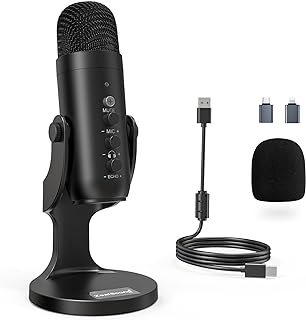
Get your ZealSound USB Microphone on Amazon today
MAONO USB Microphone Professional Mic Kit
Delivering studio-level sound quality, the MAONO USB Microphone kit is an ideal match for podcasting, singing, gaming, and even YouTube. With a simple plug-and-play set up, a professional sound chipset, and a quality condenser microphone, you can trust this kit to perform brilliantly, capturing every nuance of your voice perfectly every time.
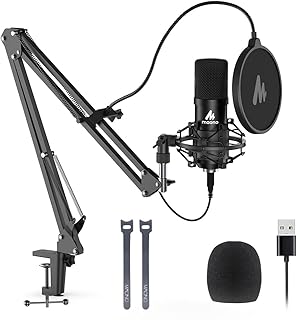
Acquire the MAONO USB Microphone on Amazon now
RØDE PodMic USB Dynamic Broadcast Microphone
The RØDE PodMic is a dynamic microphone with XLR and USB connectivity, designed to deliver excellent sound quality in any broadcast scenario. It’s incredibly versatile and suited to a wide array of applications, from podcasting and streaming to gaming, music-making, and content creation. With RØDE, you know you're getting a durable microphone that can withstand busy content creation schedules while consistently delivering top sound quality.
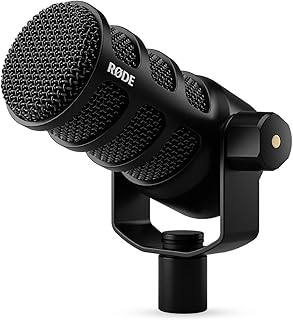
Purchase the RØDE PodMic on Amazon
Sponsored Area