RIVERSIDE FM Beginners Tutorial 2026 (Complete Beginner Tutorial for Podcast Recording)
3,013 View

- Publish Date:
- October 5, 2026
- Category:
- Equipment for Podcasting
- Video License
- Standard License
- Imported From:
- Youtube
Riverside.fm is a browser-based podcast and video recording platform that records each speaker in separate high-quality tracks locally before uploading — no software installation needed. This beginner tutorial walks you through the only 4 things you need to know to record your first podcast: setting up your account, configuring your microphone and camera, creating your recording room, and inviting a guest — so you can go from sign-up to your first session in under 15 minutes.(one blank line)
🎯 What You'll Learn
Navigate the Riverside.fm dashboard and understand what every menu option actually does
Set up and test your microphone and camera correctly before you ever hit record
Create your recording studio, configure audio and video settings, and choose the right resolution
Invite a guest to your podcast using a shareable link — no Riverside account required on their end
Start, stop, and find your recording after the session so nothing gets lost
Open your project in the editor and understand how separate tracks work in Riverside
⏱ Chapters
0:00 – Why Riverside.fm is the easiest way to record a podcast without installing anything
1:01 – How to navigate the Riverside dashboard and understand what each menu does
2:32 – How to organise your projects, schedule recordings, and host your podcast in one place
3:32 – How to access studio settings and understand the difference between host and producer mode
5:03 – How to set up your microphone and camera correctly before your first recording
5:35 – How to test your mic inside Riverside so you know it works before going live
6:38 – What to do if your microphone or camera is not showing up in Riverside
7:10 – How to create a recording studio and set up your room in Riverside
8:11 – How to configure audio, video, resolution, and recording settings inside the studio
9:44 – How to invite a guest to your Riverside podcast using a link or email
10:46 – How to choose guest, audience, or producer roles when sending an invite
11:49 – What your guest experiences when they click the link and join your session
12:20 – How to start recording, stop the session, and wait for uploads to finish
13:21 – How to find your recording in projects and open it for editing
13:54 – How to use the Riverside editor and work with separate audio and video tracks
14:55 – How to download your tracks, transcript, and final video after editing
15:26 – Key takeaway: you are now set up and ready to record your first Riverside podcast🔗 Resources
🌐 Riverside.fm official website → https://www.riverside.fm
💰 Riverside.fm pricing & plans → https://www.riverside.fm/pricing
🎙️ Riverside.fm help center → https://support.riverside.fm
🔍 Whether you're starting a podcast from scratch, recording remote interviews, or looking for a beginner-friendly browser-based recording platform, Riverside.fm gives you studio-quality separate tracks without any complicated setup.▶️ Subscribe for weekly tutorials on podcasting tools, AI audio workflows, and creator software that actually works for beginners.
For Promotions & Brand Deals, Contact: emmabranddealsfc (at) gmail dot com
-----------------
Podcast in The Classroom - Kindergarten to High School
Looking for a fun and engaging way to teach students? Podcasting in the Classroom is an incredible tool that brings multimedia learning to life! Whether you're teaching Kindergarten or High School, this course will show you how to use podcasts to enhance learning, engage students, and even involve parents.
In this course, you’ll learn how to:
✅ Use podcasts as an interactive tool to engage your students
✅ Teach students how to create their own podcasts
✅ Keep parents and students up-to-date with podcast updates
✅ Review and improve teaching performance through podcasts
✅ Overcome common challenges like copyright and privacy concerns
With over one billion podcast subscribers worldwide, your students are likely already listening to podcasts — now, let them create their own! 📚
👉 Click here to enroll now and take your teaching to the next level with podcasts.
Make learning more interactive and fun — let's get podcasting in the classroom! 🎤
Top 2 Podcasting Equipment for Superior Audio Quality
USB C Lavalier Microphone Wireless Mini Mic
This USB C Lavalier Microphone is a compact and handy addition to any aspiring content creator’s arsenal. Designed specifically for Type-C Android devices, tablets, or PCs, it's perfect for video recording. Additionally, the microphone’s denoise recording feature helps ensure quality sound while the rotatable clip offers flexibility of use.
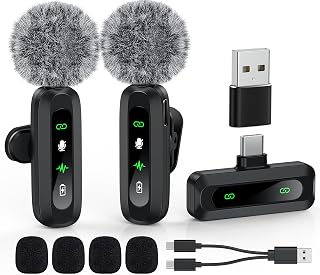
Shop this USB C Lavalier Microphone on Amazon
Audio Interface Podcast Equipment Bundle for 2
This podcast equipment bundle for two is suitable for live streaming, YouTube, gaming, and even singing. The bundle features a distinct audio interface with an in-built voice changer, condenser microphones that ensure top-quality sound, and a reasonable price tag. It is a perfect choice for gamers or anyone looking to start a dual-host podcast.
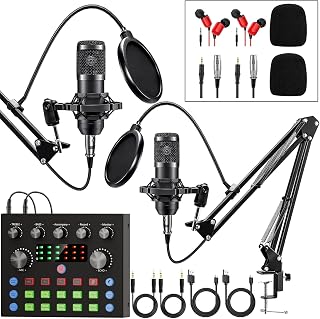
Own this podcast equipment bundle from Amazon
Sponsored Area